How to Use Claude Code with Business and Customer Data
Blog Post
12/10/2026
How to Use Claude Code with Business and Customer Data
Working with client data in Claude Code requires control over how it's processed. This article covers setting up Claude Code through Google Cloud, so that the data are processed in the EU, according to the DPA and without model training.
Many freelancers and agencies now use Claude Code to work with non-public data. This may include personal data belonging to their clients' customers, which is subject to GDPR, or data from clients' websites, advertising platforms, and CRM systems. Even when this data doesn't contain personal information, sharing it with third parties may be restricted by a non-disclosure agreement (NDA). They use this data to perform analyses, build models and dashboards, or integrate it into other workflows using Claude. In this article, we'll show you how to work with such data in compliance with legal requirements while maintaining control over where it goes and where it's processed. We'll also look at how to apply the same approach to personal use cases involving private or sensitive information.
What Types of Data Require Extra Care?
Typical examples include exports from CRM and e-commerce systems containing names, email addresses, phone numbers, addresses, and order histories. Other examples include email marketing contact lists and audiences uploaded to advertising platforms.
Some data may not appear to be personal information at first glance. However, GA4 exports containing user IDs or client IDs, cookie identifiers, IP addresses, and server logs are still considered personal data under GDPR because they can be linked to an identifiable individual.
You should also be careful with customer-generated content, such as support tickets, chat transcripts, survey responses, and reviews. These can unexpectedly contain personal information or even sensitive data, such as health information. Another category is data that doesn't contain personal information but is protected by an NDA. This may include client revenue, margins, campaign performance, pricing, or business plans.
Why You Shouldn't Process This Data Using Claude Pro or Max
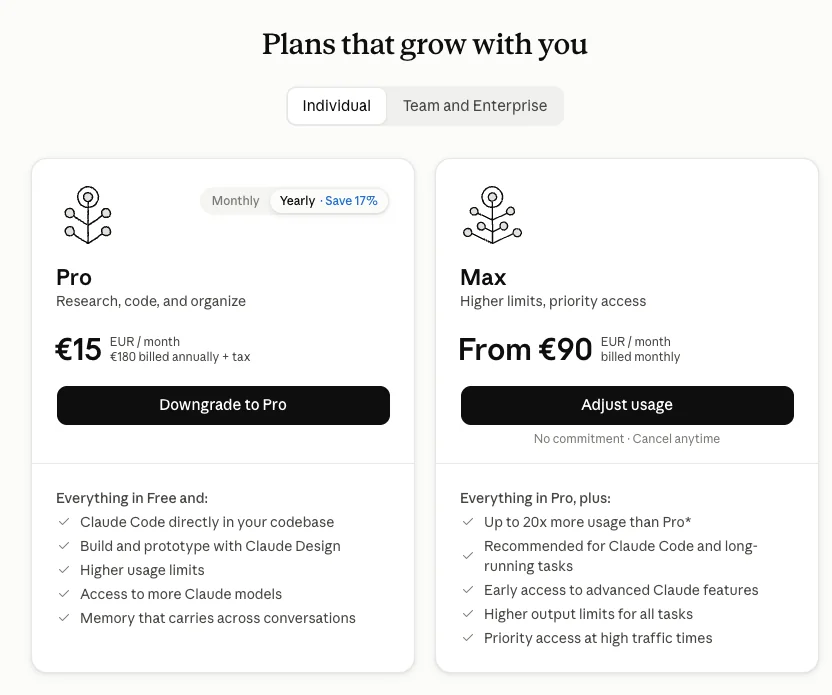
Most Claude and Claude Code users are on the Pro or Max plans. However, these are consumer products governed by consumer terms of service. This creates a problem when it comes to GDPR compliance and processing client data. If you process personal data belonging to your clients' customers, you need a Data Processing Addendum (DPA) with each additional data processor. Anthropic doesn't offer a DPA for its Pro and Max plans.
The second issue is model training. On the Free, Pro, and Max plans, Anthropic may use your conversations and Claude Code sessions to train new models if you've enabled this option in your settings. In that case, the data may also be retained for up to five years. Although you can disable this option, it's simply a setting in your user account, not a contractual commitment you can rely on when dealing with clients.
The third issue is data processing location. Consumer plans don't let you choose the region where your data is processed, so you cannot demonstrate that it has remained within the EU. Anthropic may therefore send your data to an endpoint located in the US, Asia, or elsewhere.
The same principle applies to data protected by an NDA, even if it contains no personal information. You've committed to your client that you won't disclose this data to third parties, and a consumer account provides no contractual basis for doing so. The Team and Enterprise plans do offer a DPA. However, they still don't allow you to select an EU processing region, which may be an issue for some larger clients.
You should also pay attention to MCP servers that work directly with client data. Here, too, you need to consider which model processes the data. If an agency deploys an MCP server that directly handles a client's customers' personal data while using one of these plans, it's taking a risk.
So, what's the solution?
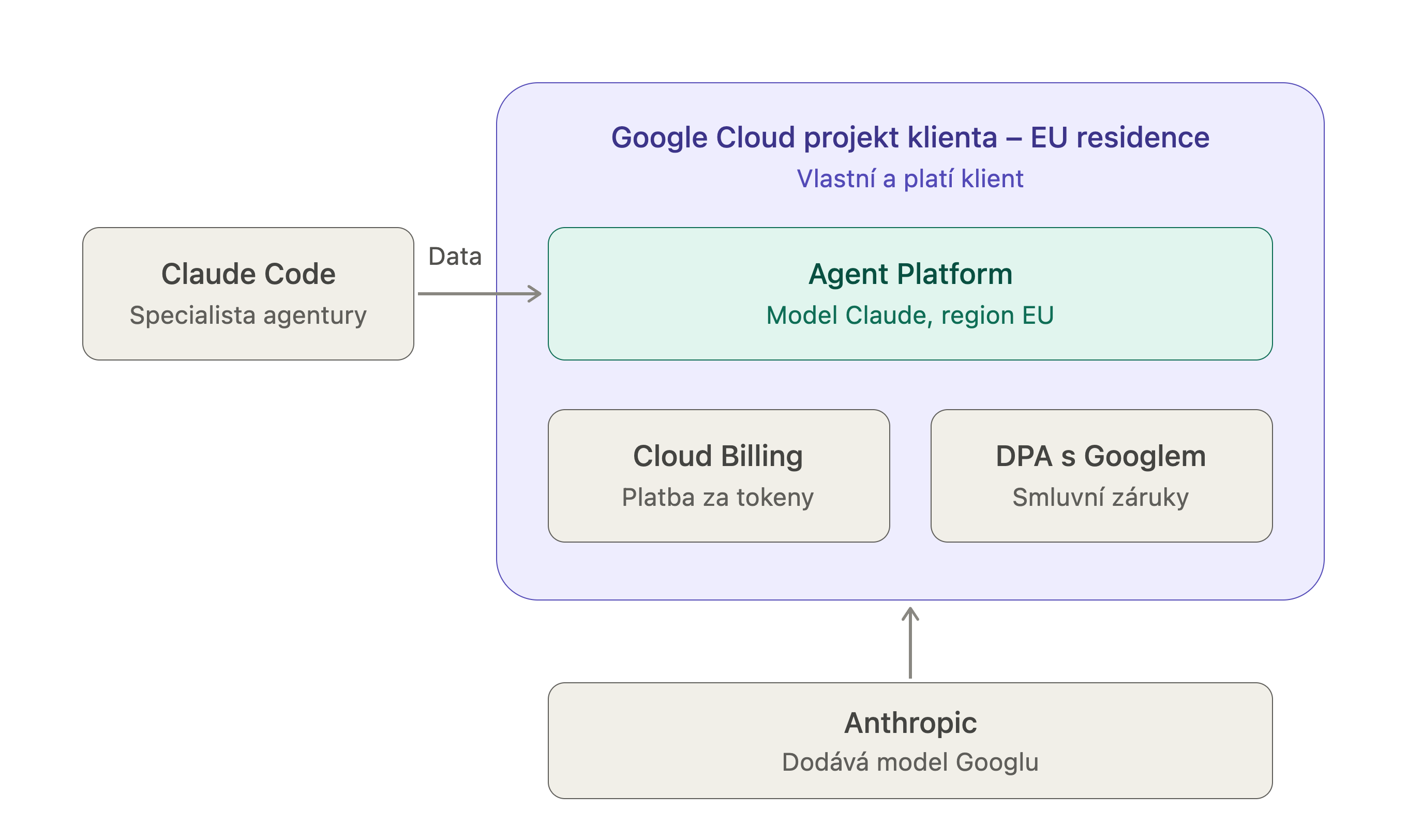
The solution is to use Claude in an environment that provides the necessary safeguards. Our preferred approach is to access Anthropic's large language models through a third-party provider that offers a DPA and guarantees data processing within the EU. In other words, the provider must allow you to select the region where the data is handled and processed. We recommend Google Cloud, which acts as a reseller for a wide range of large language models, including models from providers other than Anthropic. It provides the safeguards needed to support compliant processing of data belonging to EU businesses and their customers. Google offers a service called Agent Platform, where you can enable most of the latest Claude models. You can then use these models not only in Google Cloud applications and workflows, but also directly in Claude Code. In this article, we'll focus primarily on configuring Claude Code to use Anthropic models purchased through Agent Platform, where all current models are available.
The key advantage is that freelancers and agency specialists can continue working with client data through Claude Code while using a model enabled within the client's own Google Cloud project. In practice, the specialist is simply working with the client's data using the client's own setup, since a properly configured Google Cloud project is owned by the client, not the agency. The specialist can also switch between different client Google Cloud projects. For example, they might work with Client A's data one day and Client B's data the next.
We'll walk through the required setup, model selection, and three configuration options, ranging from a single session to a global setup. We'll also cover processing regions, working with sensitive files, and setting budgets.
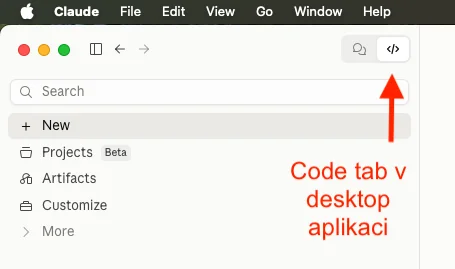
This entire procedure applies specifically to Claude Code, the command-line tool (or the Code tab in the desktop application). The standard chat interface on claude.ai, as well as in the desktop and mobile applications, cannot be switched to the Agent Platform. It always operates under your Anthropic account and is therefore subject to the terms described above.
Consequently, if you enter any client or sensitive data into the standard chat interface, none of these guarantees apply.
Setting Up Claude Code with a Model Purchased Through Google Agent Platform
Agent Platform is the newer name for a service Google previously called Vertex AI. You may therefore encounter both names in the documentation. For consistency, we'll use Agent Platform throughout this article.
Prerequisites
Before we start configuring anything, we'll need:
A Google Cloud account with billing enabled
Google Cloud SDK (gcloud) installed
Claude Code installed
Agent Platform API enabled
You can enable the API through the API Library or by running:
gcloud services enable aiplatform.googleapis.com
Once the basic setup is complete, we can move on to selecting a model.
Selecting and Enabling a Model
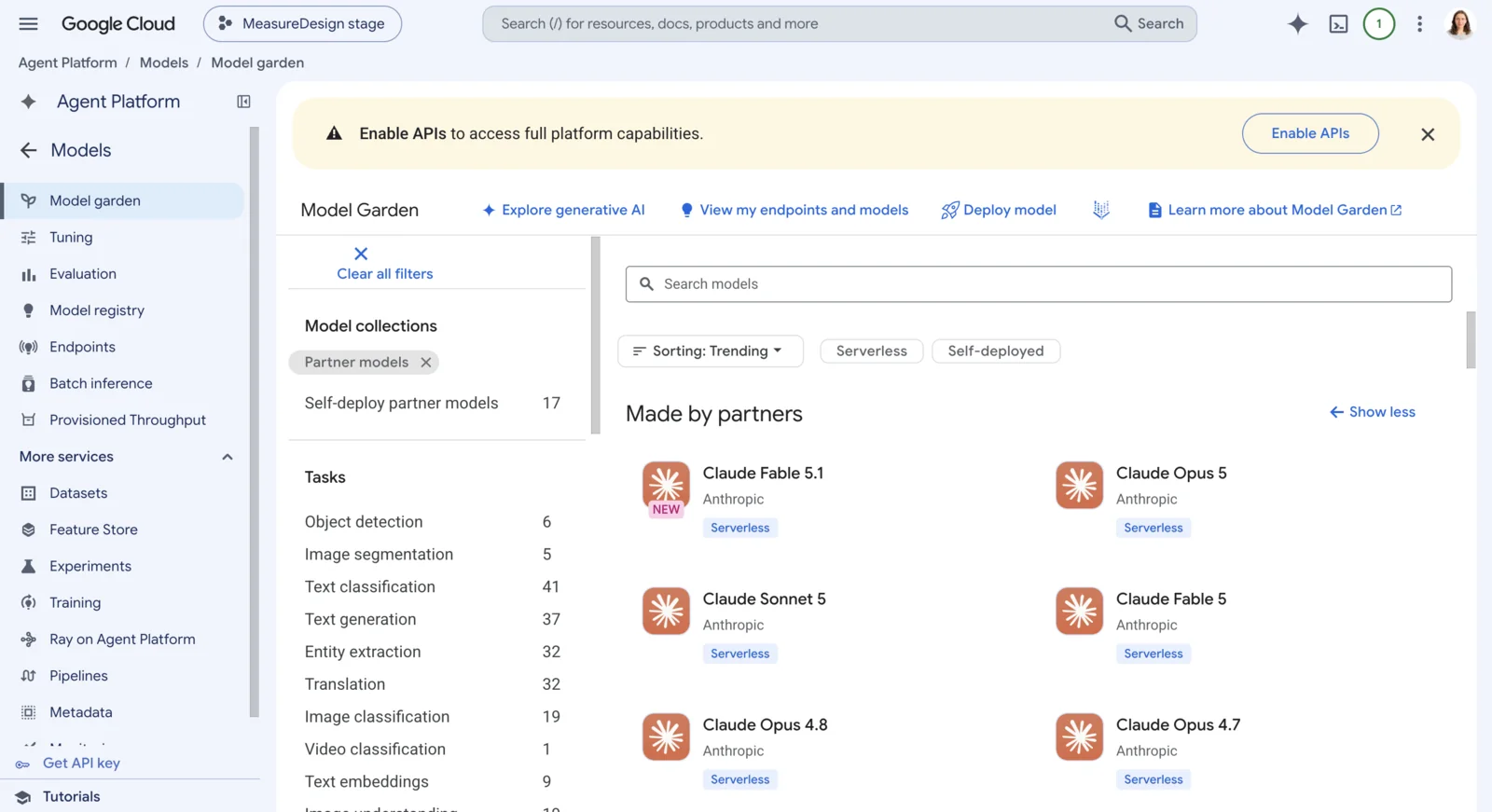
Choose a model based on what you intend to use it for. For simple tasks, for example, there's no reason to use an unnecessarily expensive model. You should also check its availability and pricing in advance. You can find a list of available models and their prices in Model Garden within your Google Cloud project.
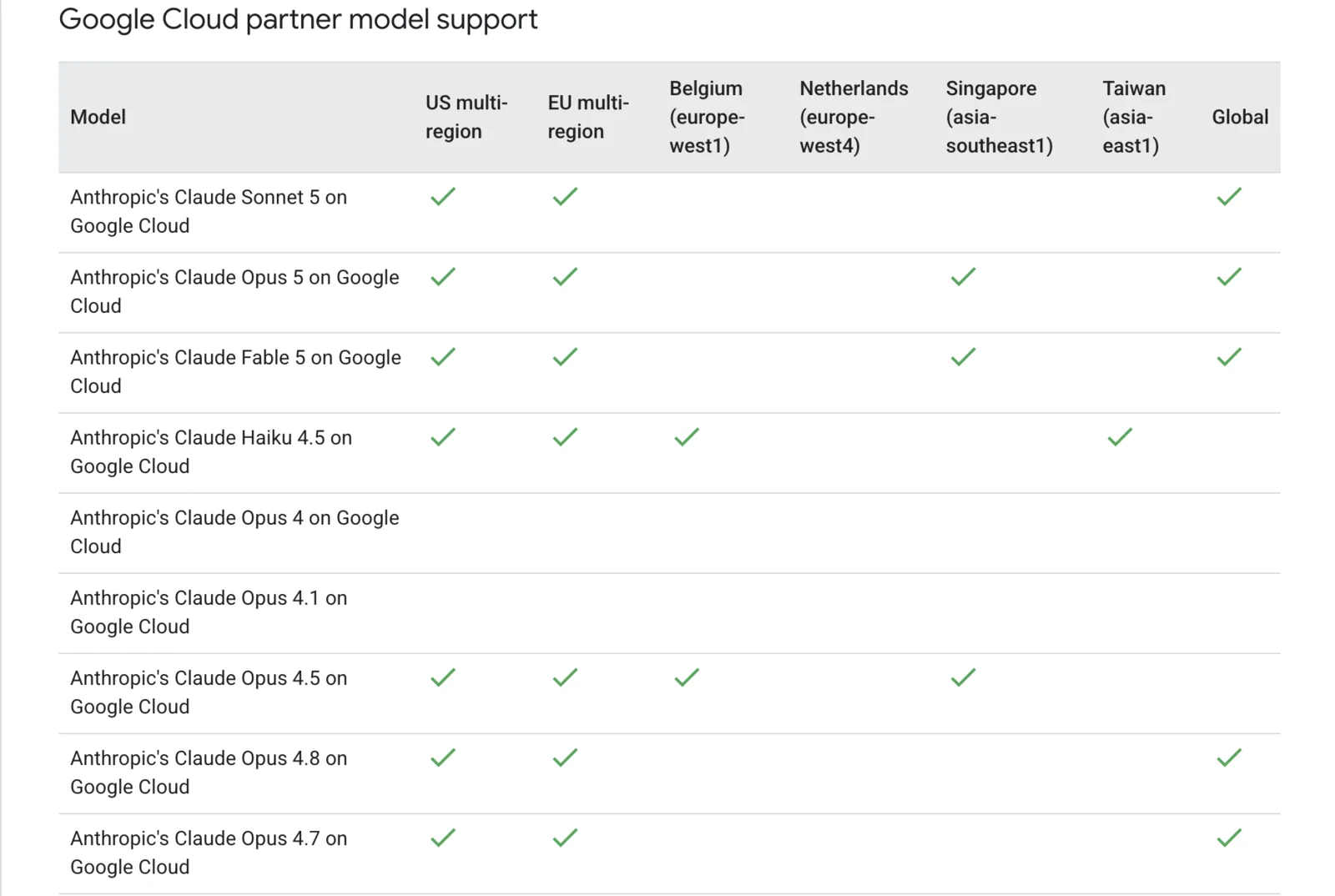
When selecting a model, pay attention to the supported processing regions. Some models support single-region processing, others support multi-region processing, and some support both.
The difference lies in where processing can take place. With a single-region configuration, for example, you can select Belgium, and the data will be processed only in that region. With a European multi-region configuration, data may be processed anywhere within the EU. Multi-region processing also tends to be faster. You can check which regions are supported by individual models in Google's documentation.
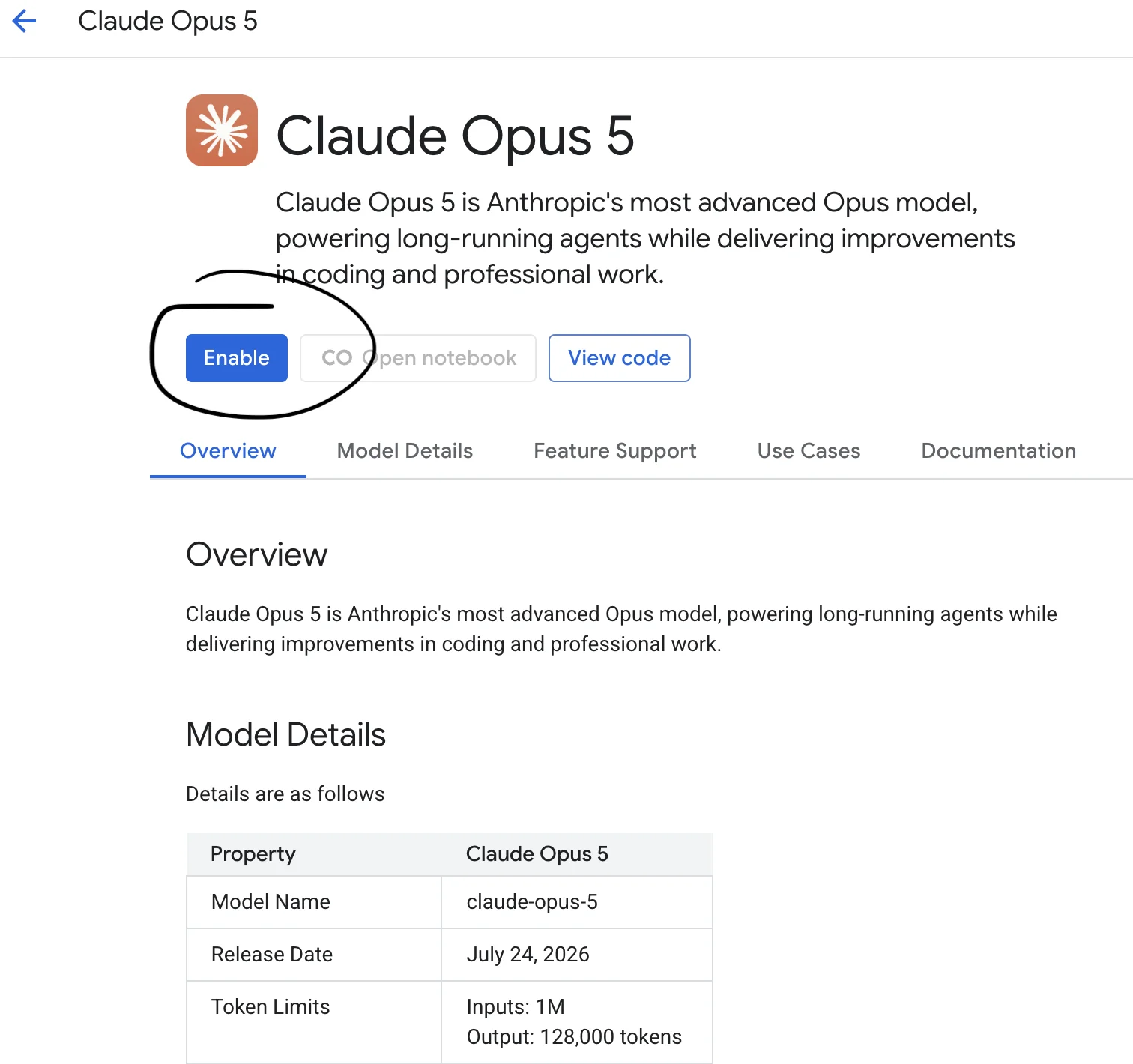
Once you've selected a model and confirmed that your preferred region is supported, enable the model in Model Garden. Simply click Enable on the model's page.
Configuring the Environment
After enabling the model, we can start configuring Claude. First, we need to decide how we want to use Agent Platform. There are three options.
1. Using Agent Platform for a Single Session
The quickest option is to configure Agent Platform for just one session. Simply launch Claude with a command that specifies the project ID and model:
CLAUDE_CODE_USE_VERTEX=1 \
CLOUD_ML_REGION=eu \
ANTHROPIC_VERTEX_PROJECT_ID=PROJECT_ID \
claude --model claude-sonnet-5
You'll need to adjust the command to match your project and selected model.
It's important to use a compatible combination of model and region. Not every model supports every region, and an incorrect combination may cause Claude to return a 429 error.
This option is particularly useful for a quick test. The configuration applies only to that specific session and doesn't affect your other projects.
2. Using Agent Platform in a Specific Folder (Recommended)
For everyday work, we recommend configuring Agent Platform at the individual project-folder level. This gives you control over where Claude uses Agent Platform without affecting the configuration of your other projects. For example, you can create a folder for Client A and use a model purchased through that client's Google Cloud project. If you need to work with another client's data (Client B), you can switch the configuration in Client B's project folder to a model purchased through their Google Cloud project.
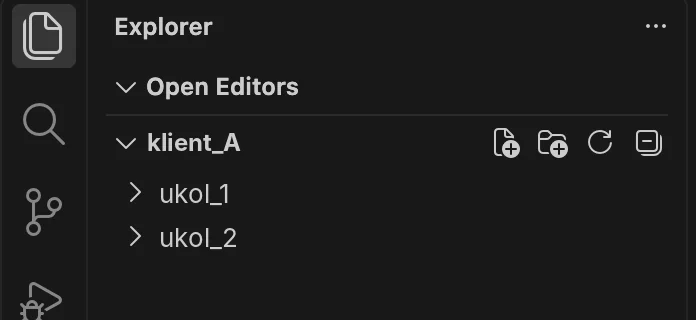
To illustrate this, let's look at a scenario where we want to use Agent Platform for all tasks involving client data in a folder called klient_A.
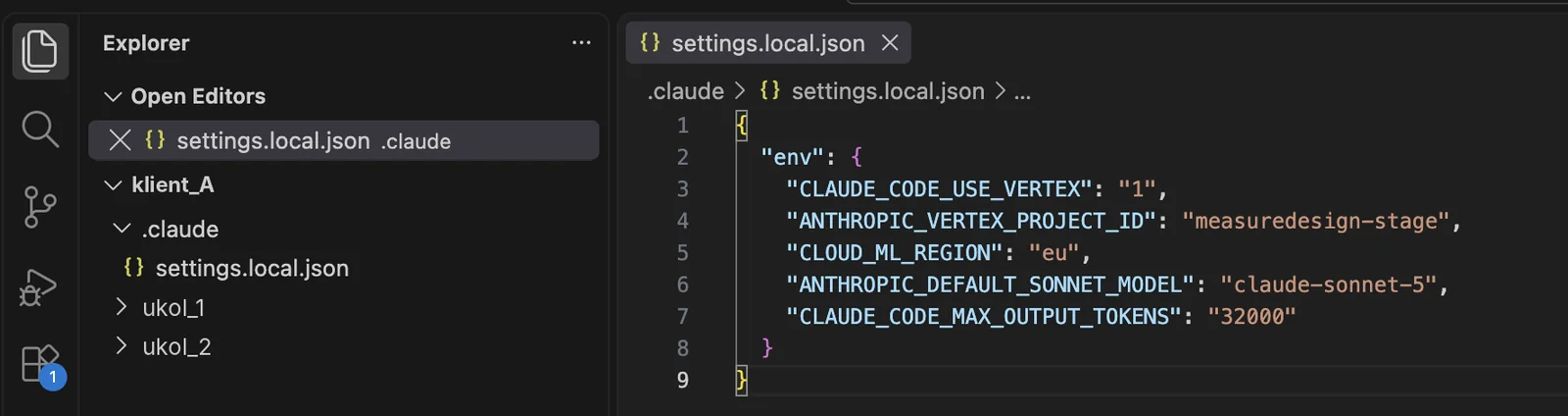
Inside the klient_A folder, create a .claude directory to store the configuration. Then create a file named settings.local.json inside it and add the required settings.
The basic configuration includes only a small subset of the available variables. You can find the complete list in the Claude documentation. These variables include, for example, the context window size and the maximum number of output tokens.
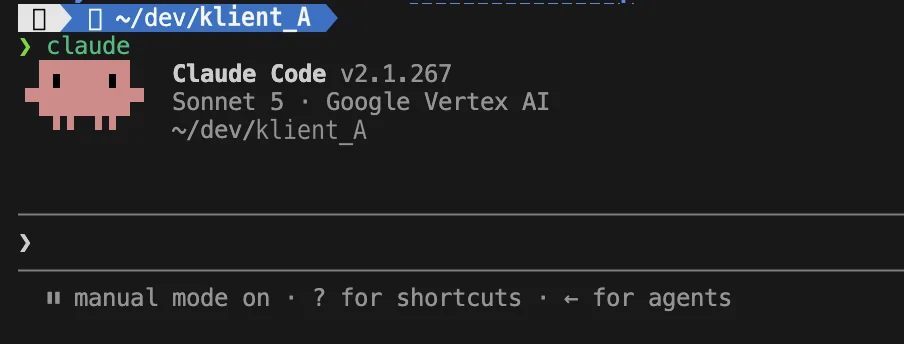
Next, launch Claude in your terminal using the claude command and verify that it's using the Agent Platform configuration.
We consider this option the best balance between convenience and control. Agent Platform is used only where we explicitly want it, without requiring changes to the computer's global configuration.
3. Using Agent Platform Globally
The final option is a global configuration. In this case, the Agent Platform configuration is also applied automatically in the Claude Desktop application, specifically in the Code tab (not the chat tab!).
There is an important caveat, however. Although processing takes place within the EU, we haven't been able to verify whether the conversation itself is logged or stored on servers outside the EU. The safer option is therefore to use Claude Code.
If you want to use Agent Platform for all your projects, a global configuration may be suitable. For example, this could be the case if you're a freelancer working exclusively for one client and don't use Claude for personal tasks on the same computer.
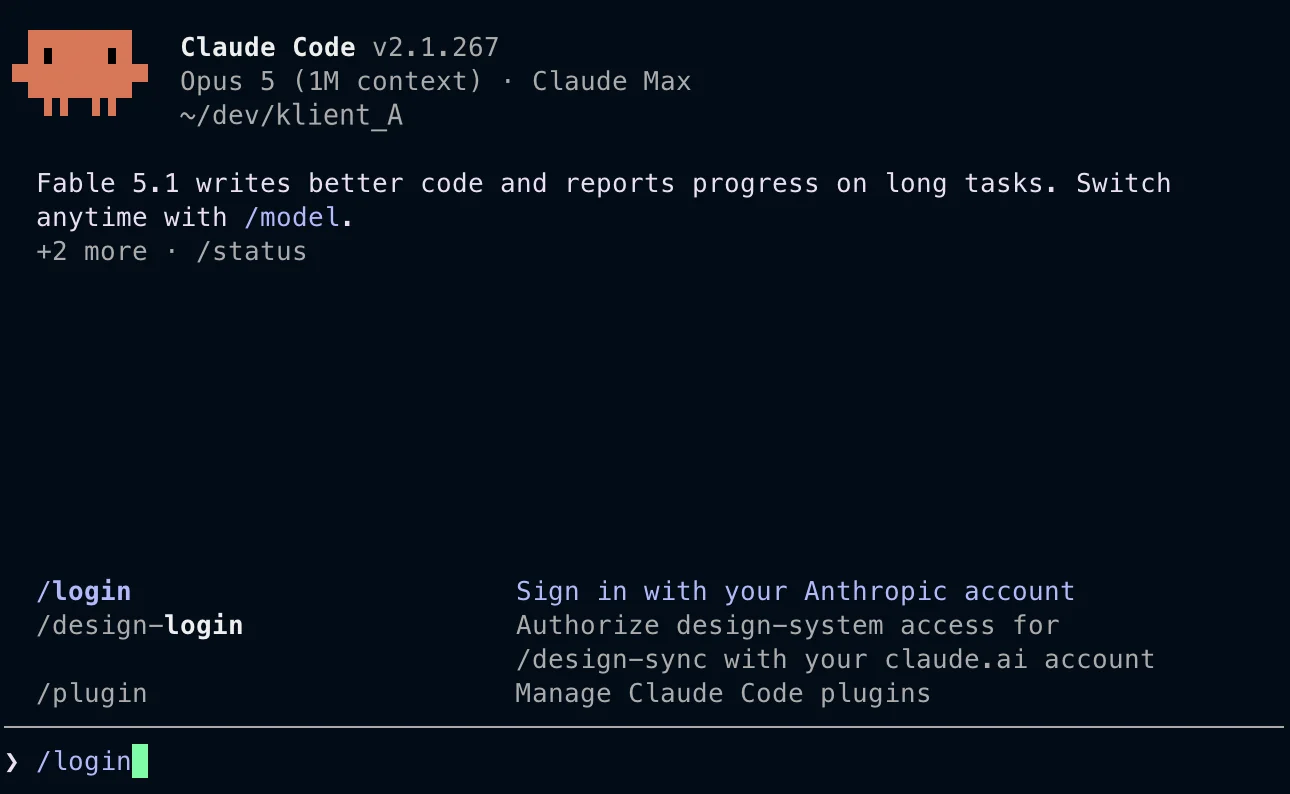
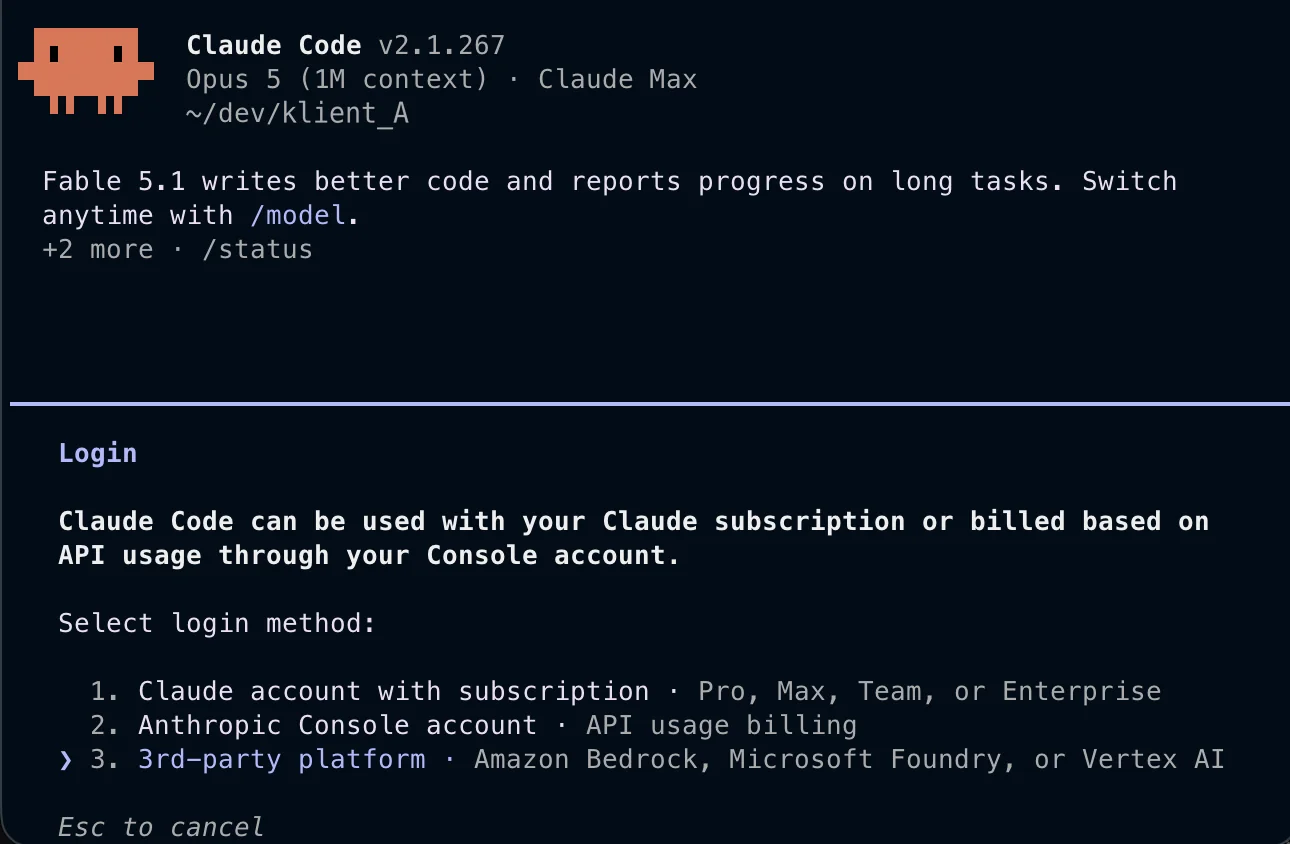
You can set up the global configuration directly in Claude using the /login command.
The setup wizard is straightforward. Simply follow the steps to select Agent Platform, configure the data processing region, choose your Google Cloud project, set up authentication, and specify the remaining parameters.
You can then review and modify the configuration in much the same way as with the second option. The global configuration is stored in: /Users/user/.claude/settings.json
TIP: On a Mac, the .claude folder is hidden by default. You can reveal hidden folders using the keyboard shortcut Command + Shift + .
Monitoring Model Costs
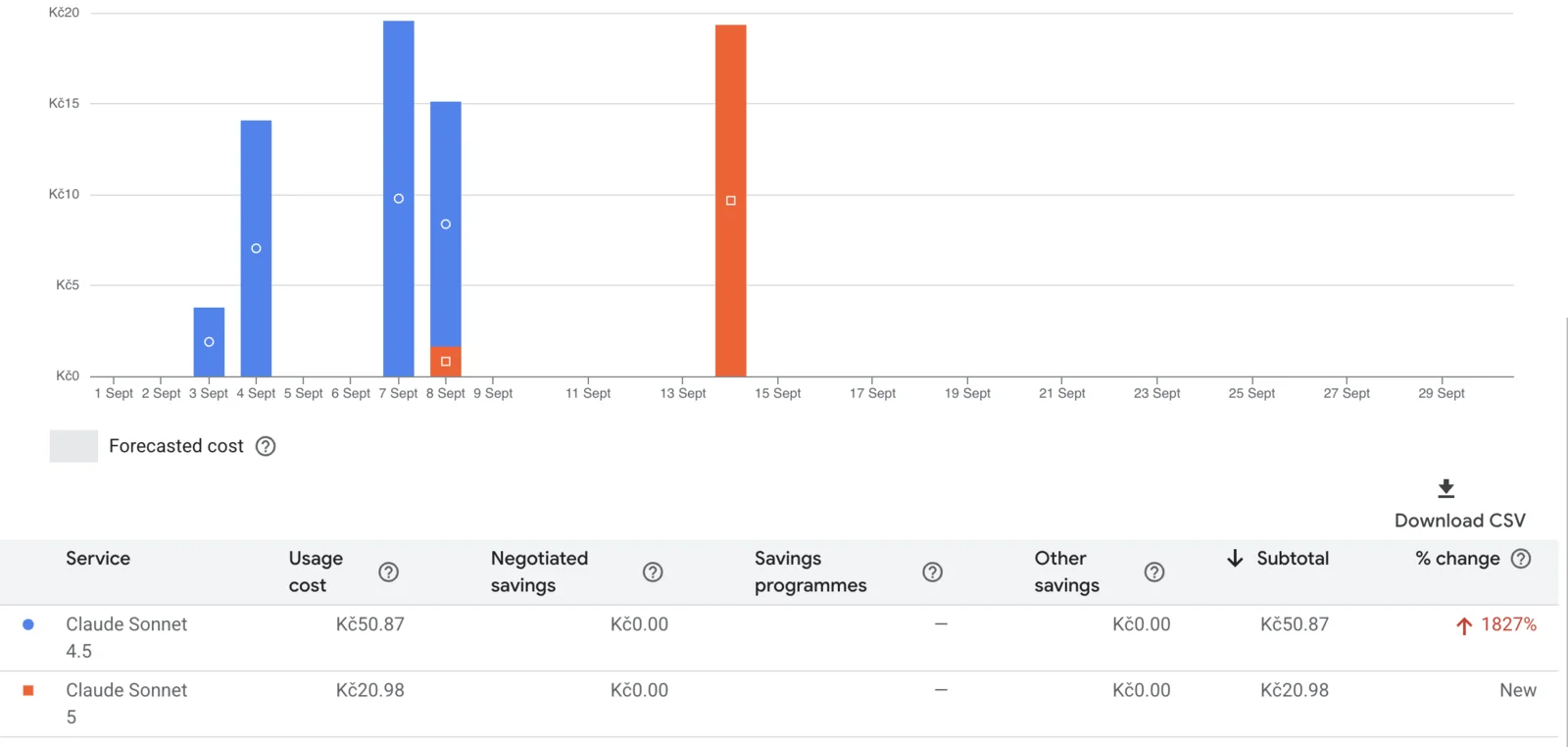
When using models through Agent Platform, it's also important to monitor your spending. Model usage is billed through Google Cloud Billing, rather than being covered by a Claude Pro or Max subscription. In Google Cloud Billing, you can see how much you're spending on individual models each day. You can also filter costs by model to get a clear picture of how much each one actually costs to use.
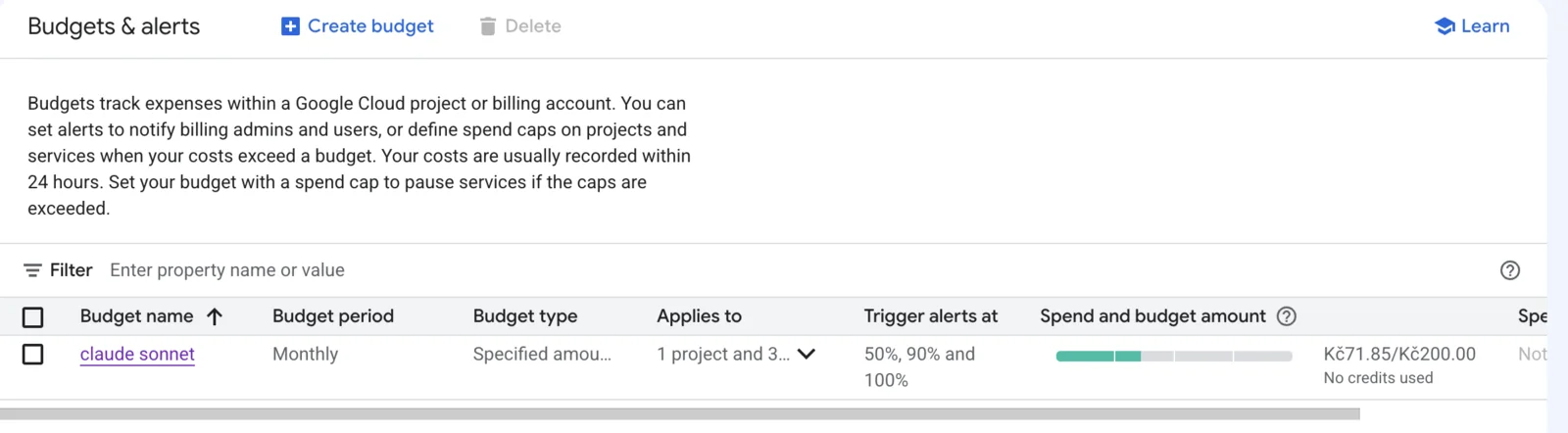
In addition to viewing costs, you can set budgets and alerts. You'll find these under Billing → Budgets & Alerts. Set the amount you want to allocate to model usage, then choose the spending thresholds at which Google Cloud should notify you.
For example, you might set a budget of CZK 200 and configure alerts at 50%, 90%, and 100% of that amount. You'll receive an email notification whenever one of these thresholds is reached.
However, it's important to account for delays. According to Google Cloud, costs may take up to 24 hours to appear in Billing. This means an alert might not arrive at the moment you actually spend the specified amount. For example, you could significantly increase your spending on Monday but not find out that you've exceeded your budget threshold until Tuesday.
For this reason, a budget shouldn't be treated as a hard spending limit or as protection against immediately exceeding your intended costs. Its primary purpose is to provide monitoring and notifications.
Google Cloud also offers other ways to control costs, including options for disconnecting a model when spending limits are exceeded. However, this is a more complex topic, and we'll try to cover it in a future article.
Protecting Sensitive Files
Regardless of which configuration option you choose, Claude is typically launched from within a specific project folder. By default, it can work with files stored in that project. These may include files such as .env, which can contain API keys, tokens, or passwords.
You need to explicitly restrict access to these files because the default configuration doesn't block them from being read.
To do this, you can add a permissions.deny section to either settings.local.json or the shared .claude/settings.json file:
This recommendation applies regardless of which of the three configuration methods you choose. Whenever you launch Claude within a project, you should carefully consider which files you want it to be able to access.
Using Claude for Sensitive Personal Matters (Vašek)
The approach described above can also be used for personal matters that you don't want to share without any control over where the information goes. Instead, you can use a model that processes data within the EU and doesn't train on that data. Maybe I'm being a little paranoid, but whenever I want to discuss something more personal with Claude, I use Claude Code connected to my own Google Cloud project, which I pay for myself. This includes topics such as health, finances, or legal matters. Of course, you should always take the responses with a grain of salt. :)
Final Summary
Using Claude through Agent Platform allows us to combine Claude's capabilities with control over the region where the model processes data. The key is to choose the right model and region. Not every model is available in every region, and not all models support multi-region processing.
If you need your data to remain within a specific country, such as Belgium, choose a single-region configuration. If processing anywhere within the EU is acceptable, you can use a European multi-region configuration. Always check that your chosen model supports the required region before proceeding.
It's equally important to keep costs under control. Google Cloud Billing lets you monitor spending by individual model, while Budgets & Alerts allows you to set a budget and receive notifications as your spending approaches different thresholds.
For everyday work, we recommend configuring Agent Platform within a specific project folder. This offers the best balance between convenience and control. Agent Platform is used only where you need it, without affecting your other projects.
A single-session configuration is useful for quick testing. A global configuration is more suitable when you don't use Claude Desktop and want Agent Platform to be the default option across all projects.
Regardless of the configuration, the most important rule remains the same: only send the model data that is absolutely necessary. Just because processing takes place within the EU doesn't mean you should send everything to the model. For example, it's always better to anonymize directly identifying personal information, such as email addresses and phone numbers.
Claude is often launched directly from within a project folder, where it may have access to .env files, keys, and other sensitive information by default. That's why we recommend explicitly restricting access to these files using permissions.deny.
We hope this guide saves you time getting started and helps you avoid the risks of using this technology incorrectly.
Who is behind the article
Martina Kvasničková
AI & Data Research
Marťa explores large language models and finds practical ways to bring AI into the MeasureDesign team's daily work.
Working with client data in Claude Code requires control over how it's processed. This article covers setting up Claude Code through Google Cloud, so that the data are processed in the EU, according to the DPA and without model training.
Google Ads is one of the easiest media sources to connect to BigQuery. This guide covers DTS setup, Standard vs. Custom reports, service accounts, MCC structures, PMax tables, and common limitations.
Setting up a Google Cloud project takes just a few minutes. But basic guides leave out some important details. Here’s what to watch out for with project ownership, the free trial, and billing roles to avoid unnecessary problems later.
This year at MeasureCamp Czechia, MeasureDesign gave three talks. We covered AI analytics on company data, identifying bot traffic, and how to combine working in analytics with raising young kids.
Working on the go has its benefits, but also a few practical challenges. I’m sharing the setup I’ve fine-tuned over the years that lets me work comfortably from anywhere – from connectivity and a second monitor to ergonomics.
What should a PPC specialist know about analytics and data collection? In our workshop for uLab, we covered the entire chain, from the technical components of tracking and media platforms to collecting and activating first-party data.
How do you get data from multiple ad platforms into a single data warehouse, typically BigQuery? We’ll walk through the core architecture and key decisions before you start exporting data from Google Ads, Meta Ads, Sklik, and other platforms.
Part 3 of our first-party data series gets technical again – we'll show you how to check that data is correctly reaching each system and doing what it should. We'll look at outgoing hits in DevTools and at checks directly in the ad platforms.
A detailed guide to sessionizing the GA4 BigQuery export — from identifying sessions and reliably ordering events to two attribution models (First Event Available and Session Start), their limitations, and validating agreement between them.
Learn how to deploy server-side tracking on Google Cloud Run. Compare Stape vs Cloud Run, configure load balancers, choose billing types, and test your setup.
Complete technical guide to collecting first-party data via dataLayer, normalizing, hashing, and sending through server-side GTM to Google Ads and Meta.
Testing ClickUp MCP: hands-on experience with AI-powered automation, security concerns with access tokens, practical limitations, and who should use it.
Learn how first-party data improves campaign performance, measurement accuracy, and cross-device tracking. Discover practical ways to collect and use it.
Workshops on advanced digital analytics: BigQuery, cookieless tracking, consent, attribution, and building data warehouses for reporting and activation.
Why analytics is an excellent career for women, including those returning from maternity leave. A personal story about transitioning into data analytics.
A look back at Reshoper - advising e-shop owners on tracking and measurement, plus a roundtable on marketing automation with insights on self-hosted N8N.
From Idea to App in 48 Hours 🚀 Building AI-powered apps at #HackYourWeekend using Claude Code, tracking with BigQuery, and lessons from team development.
Recap of PPC Camp: my presentation on legally measuring data without user consent - cookieless tracking, sGTM, BigQuery, Facebook conversions, and Advanced Consent Mode risks.
Ready-to-use BigQuery SQL script to calculate Easter dates (2024-2100) using Computus algorithm. Perfect for filtering GA4 data and analyzing seasonal trends.
GA4 + BigQuery in practice: connecting analytics, CRM & media data, real-world use cases from IKEA, Shoptet, McDonald's & Česká spořitelna, and what it unlocks for marketing.
Vašek and Anička presented at MeasureCamp Prague on using Google Ads export in BigQuery, combining it with GA4 and CRM data to solve attribution issues.
Learn how to extend GA4 data retention from 2 to 14 months. Understand what retention affects, how to change settings, and what happens after data expires.
Public webinar on evaluating campaigns using GA4 dataset in Google BigQuery. Featuring Vašek Ráš and Honza Tichý on DBT, SQL queries, and data flattening.
Jana focuses on UX, content and website development at MeasureDesign, making websites clearer and easier to use. She also designs and builds sites for her own clients and values teamwork and finding solutions together.
Vojtěch Černý
IT & Data Developer
Vojta works at MeasureDesign on developing technical and data solutions that are not only functional, but also practical and easy to use. He enjoys combining web development, automation, and data work to create solutions that make sense both from the user’s perspective and in terms of the technical foundations behind them. What he finds most rewarding is turning a more complex problem into a clean and reliable solution.
Jiří Otipka
Analyst
Jirka has been working in marketing for over 10 years, and if there is anything he enjoys more than numbers themselves, it is connecting them. He loves mathematics and data analytics, and thanks to his interest in exploring source code, he can easily communicate with developers in their own language. At MeasureDesign, he specializes in connecting new data sources - building custom connectors in Python, testing data quality, and exploring which data combinations make the most sense from a business perspective. He is completely at home in Looker Studio and also has extensive experience evaluating PPC campaign performance.
Lenka Pittnerová
Analyst
Lenka joined MeasureDesign at the end of 2025, bringing extensive experience from PPC marketing, where she spent many years working with Google Ads, Meta Ads, and other advertising platforms. While managing campaigns, she repeatedly ran into the same issue - poorly set up or insufficient web analytics, which made effective optimization nearly impossible. This challenge initially led her to analytics out of necessity, but over time she discovered that she enjoyed it even more than advertising itself. Today, she focuses primarily on implementing web analytics and data solutions that provide companies with high-quality, reliable data for strategic decision-making and performance marketing. She continues to work on selected PPC projects as well - not only because she still enjoys them, but mainly to stay closely connected to the reality of media platforms and the real needs of clients.
Martina Kvasničková
AI & Data Research
Marťa helps integrate AI into everyday work—making it faster, more efficient, and accessible to every team member. What excites her most is finding practical ways to use AI and turning new technologies into useful tools.
Anna Horáková
Analyst
Anička has over 7 years of experience in the agency world, where she has managed social media ad campaigns for clients, and especially for content-driven websites, her favorite. Wanting to broaden her perspective beyond campaign data, she gradually shifted her focus toward web analytics. She joined our team in 2022 and now specializes in data analytics, using GA4, BigQuery, Looker Studio, and other tools to connect and dig deeper into data — delivering insightful analyses and valuable input for business decisions. Anička was a member of our team until 2026.
Zuzana Mikyšková
Analyst & Co-Founder
Zuzka's career path led her through corporate innovation and research management, running word-of-mouth projects, and later to a digital agency, where she managed website development projects. However, Zuzka is naturally curious and wanted to understand how a website actually works once it is launched into the world. That curiosity led her to study web analytics — and eventually to a key collaboration with Vašek. In 2019, they founded the company together.
Vašek Jelen
Lead Analyst & Co-Founder
Vašek has been working in digital analytics for over 15 years — from setting up tracking to data storage, visualization, and interpretation. He helps companies keep their data in order and make full use of it. He focuses primarily on data from digital platforms such as websites, apps, and client zones, and on connecting that data with other business data like media and customer data. After years of freelancing, he co-founded the analytics studio MeasureDesign, where, in addition to working on analytics projects and bespoke training sessions, he also mentors and educates new analysts.
Blanka Hejduková
Back Office
Blanka joined our team in 2024 and has been responsible for back-office operations, including invoicing and administrative tasks, ever since. She draws on her experience from the Czech Post and her background in financial management to keep everything running smoothly. In her free time, she enjoys traveling with her two children and finds relaxation in working in her garden.
Markéta Svěráková
Analyst
Markéta started out in marketing, but then came maternity leave — and with it, total chaos. In an effort to hold on to the last bits of sanity, she turned to data. After all, numbers don’t yell, spill cereal into your keyboard, and at least they make some sense. She completed a data analytics course at Engeto Academy, where she bonded with SQL, Power BI, Excel, and Python, and started looking for patterns outside the bounds of children’s coloring books. Today, at MeasureDesign, she helps clients understand what their numbers are really saying.
Petra Súkeníková
Analyst
She joined MeasureDesign in 2023, specialising in measurement implementation and reporting. Her favourite moment is when, after all the setup and testing, the first data finally starts flowing in. Her biggest challenge? The unexpected (and often undocumented) changes from Google – those are the times when every analyst turns into a paranormal behaviour expert. 👻 She was a member of our team until summer 2026.
Klára Belzová
Analyst
Klára has been with the company since 2019. She focuses mainly on web analytics but is not afraid to dive into data work in BigQuery. What she enjoys most is guiding clients through the entire process — from defining their needs to implementing tracking and creating the final data visualizations.
She gets an almost suspicious amount of joy from a clean and well-organized GTM container or a report full of useful data.