#
Blog post
16/10/2025

How we migrated 130 media tags to the server - and how it all turned out
How we migrated 130 media tags to the server - and how it all turned out

With the rise of server-side measurement, we are increasingly implementing server-side tracking for our clients not only for analytics, but also for advertising platforms. In this article, I want to share our experience with a server-side implementation of media tags for a larger client - what we learned along the way, which templates we used, and what to watch out for.

The client we worked with already has part of their infrastructure running on Google Cloud Platform. Their server-side GTM runs on Cloud Run, and hits from front-end GTM containers are routed to it (the client measures traffic across multiple domains).

The main migration of GA4 360 to server-side GTM had already been completed earlier. The next step was a server-side implementation for advertising platforms: Google Ads, Facebook, Sklik, and Bing. 

There were several reasons for migrating the media tags:

• speeding up the website by moving media tags to the server (i.e. a better customer experience)

• security - having control over what data individual scripts send from the website

• preparing, for consented users, the setup for sending personal data and enriching it on the server 

In theory, this sounded like a breeze. Google Ads, Facebook, and Bing all have server-side templates. GA4 data is already flowing to the server, so we can use those events to trigger media tags. It should be just a matter of clicking things together - simply mirroring the tags on the server. Except it wasn’t :) 

A bit of context:

At the time of the migration, the two main GTM containers contained:

• 100 GA4 tags

• 250 media tags

• all of this was spread across 7 top-level products

• divided into 50 product groups

• which were further split into 95 individual products :)

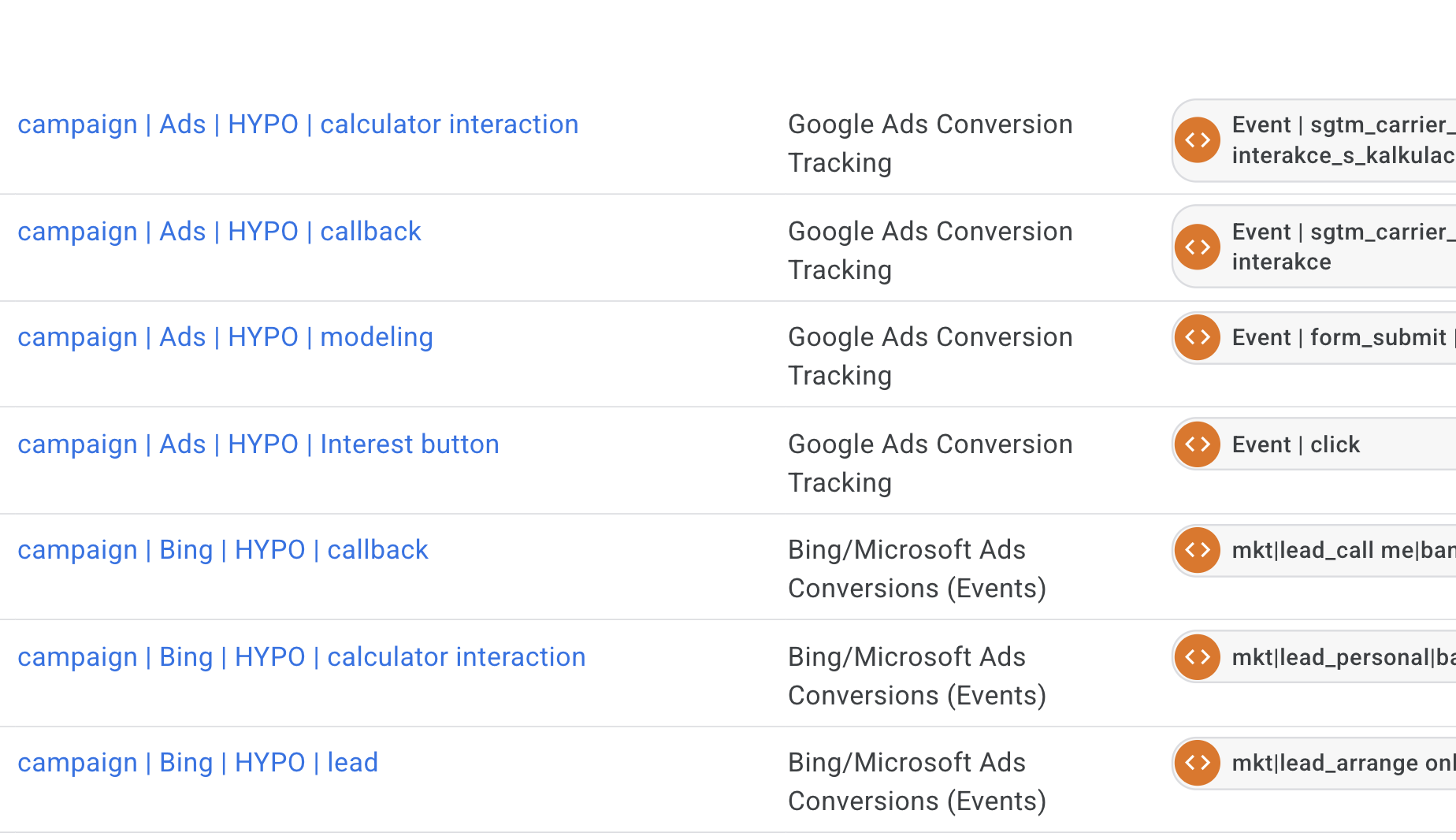
All front-end GTM containers were sending data to a single shared server-side GTM container. This meant that the media tags didn’t just need to be moved - they needed to be properly collected from multiple sources, with their triggers and naming consolidated, and then mapped to the correct conversions in each advertising platform.

Facebook: Hybrid CAPI setup

There were originally 54 Facebook tags. Together with the marketing team, we agreed to consolidate them as much as possible into a smaller number of more generic events - this was fully sufficient for campaign setup. The goal was simplification. The catch is that Facebook thrives on data - and from multiple sources.

The client agreed to run the Facebook pixel both in the browser and on the server - a so-called hybrid setup. What does that mean, and why does it make sense?

• When the pixel runs in the browser, it loads the Facebook library on the front end and collects a large amount of user information, including data gathered automatically in the background.

• When you trigger it on the server, it depends entirely on what data you pass to it. This approach is more secure and less sensitive to ad blockers.

What this looks like in practice:

1. From the browser, an event (e.g. page_view) s sent directly to Facebook. It must contain an event_id – for example, a combination of a timestamp and a random number (we generate this in the front-end GTM using a STAPE template).
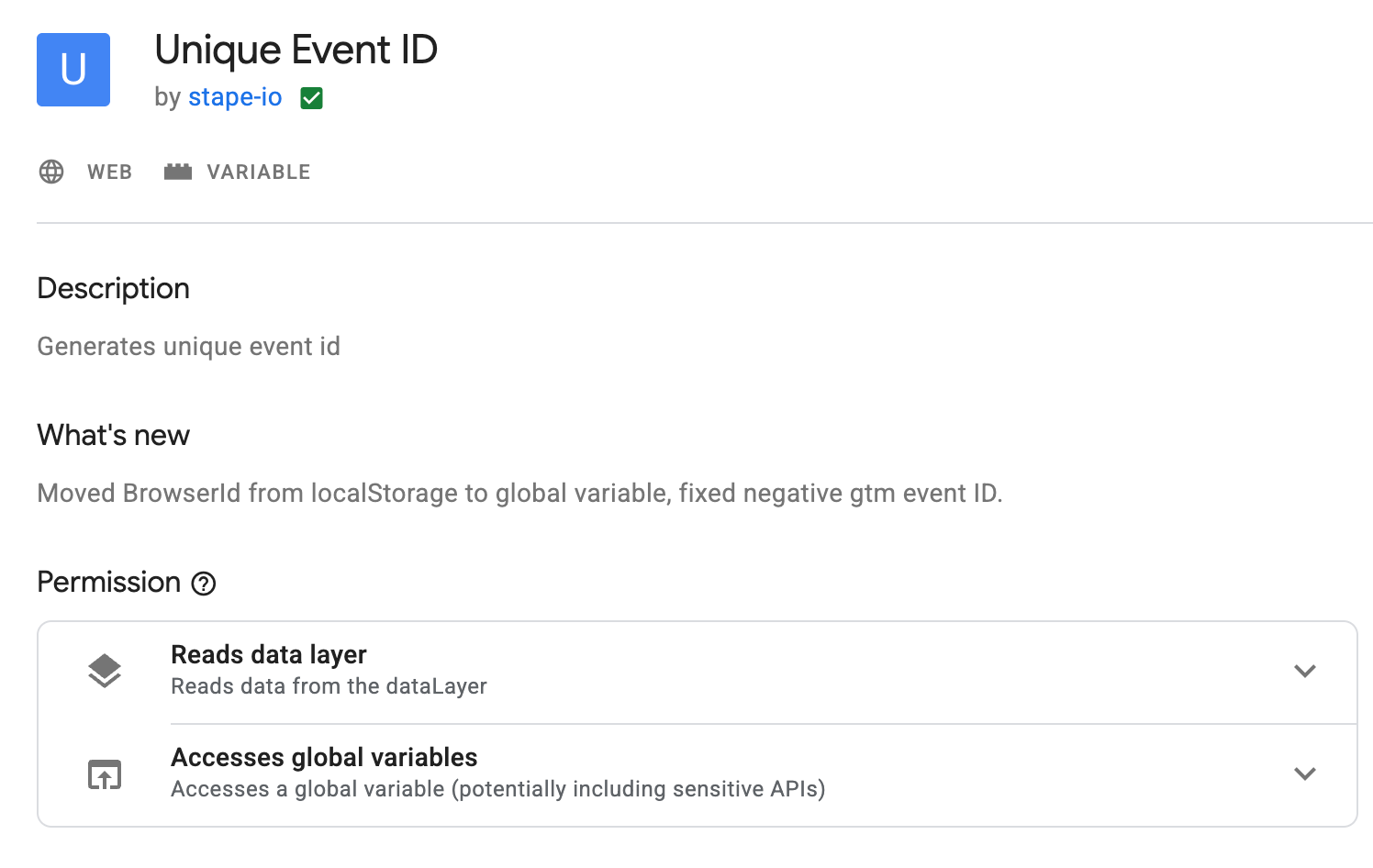
This variable has its place in the template under the More Settings section.
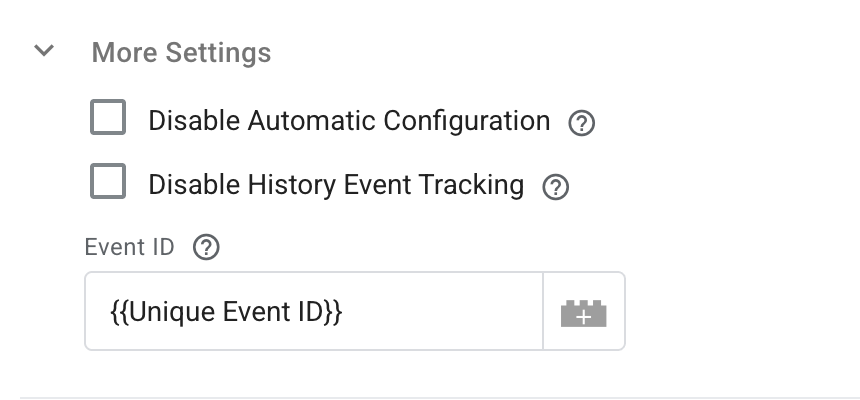
2. The same trigger simultaneously sends an event (e.g. a GA4 event) to the server - with the same event_id (passed as an event variable).

3. From the server, the same event is then sent to Facebook using the STAPE Facebook template. The Event ID is set in the Server Event Data Override section.

Facebook deduplicates events automatically. If the same event arrives from both sides with the same event_id, Facebook keeps the browser event. If the browser event is missing, the server event is used instead.

The migration looked simple on paper, but in reality it required a manual review of all 54 tags - deciding what to merge, what to keep, what to rename, and what to forward to the server.

In some cases, we had to:

• unify naming across the two main GTM containers,

• create dedicated triggers for the server, or

• send so-called transport tags (if you use a GA4 data stream to pass data to the server).

Imagine that you trigger media remarketing on gtm_consent_update. But this event is not sent to GA4, so you can’t access it on the server. Transport tags are GA4 events sent to the server purely to trigger media tags (they don’t contain the full set of parameters).

We labeled all of these with the same name, for example sgtm_transport_gtmConsentUpdate. On the server, we used them as triggers for media scripts, while at the same time excluding them from firing the GA4 Event Data tag.
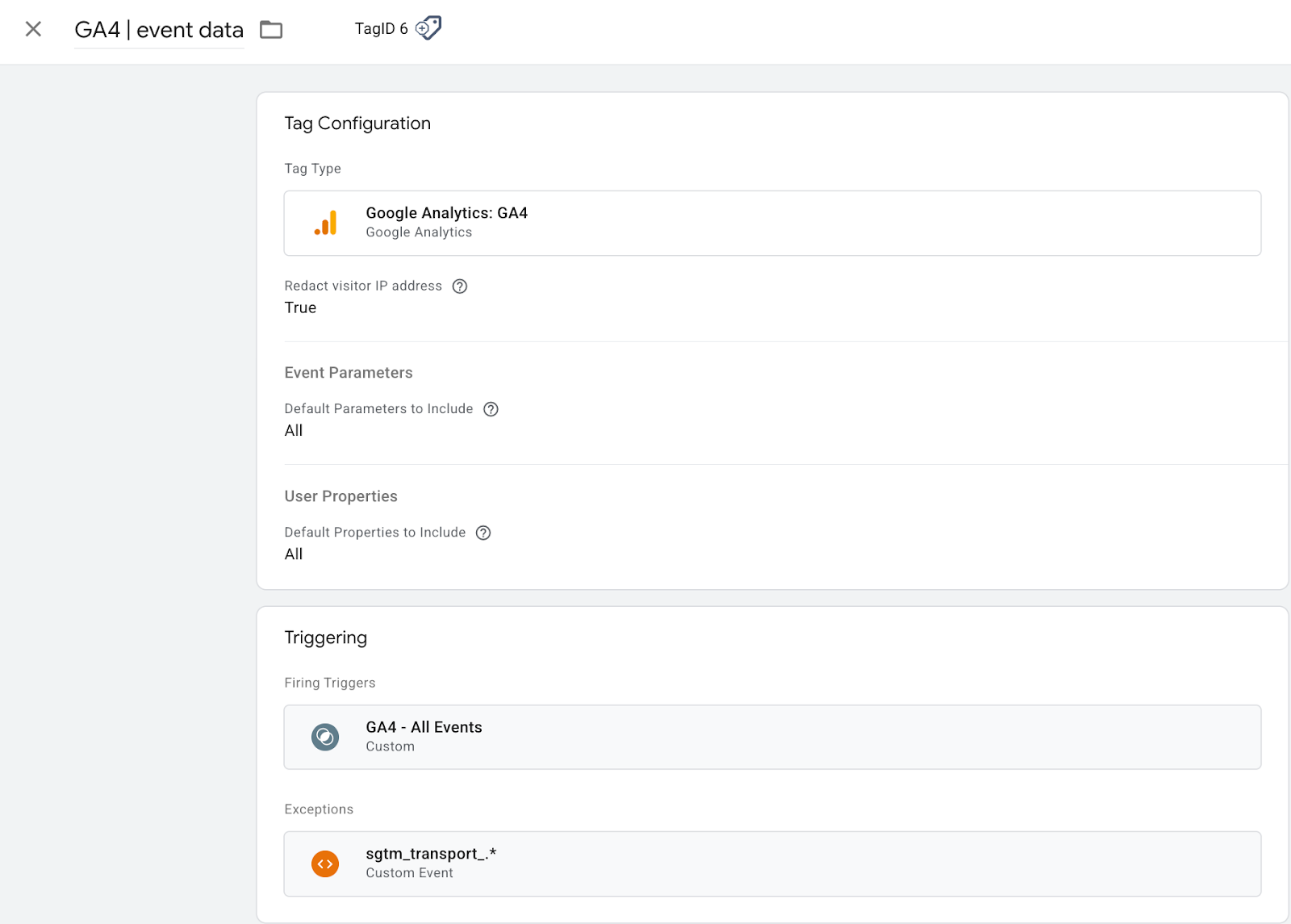
🛑 But watch out: for an event like this is the first one in a session, it can carry session source / medium. And if you exclude it from GA, you can end up with “(not set)” in attribution.

Hard-earned lessons :) Practical tips:

• Be very strict about which parameters you forward.

• For example, you probably don’t want to store event_id in GA or BigQuery - exclude it using transformations.
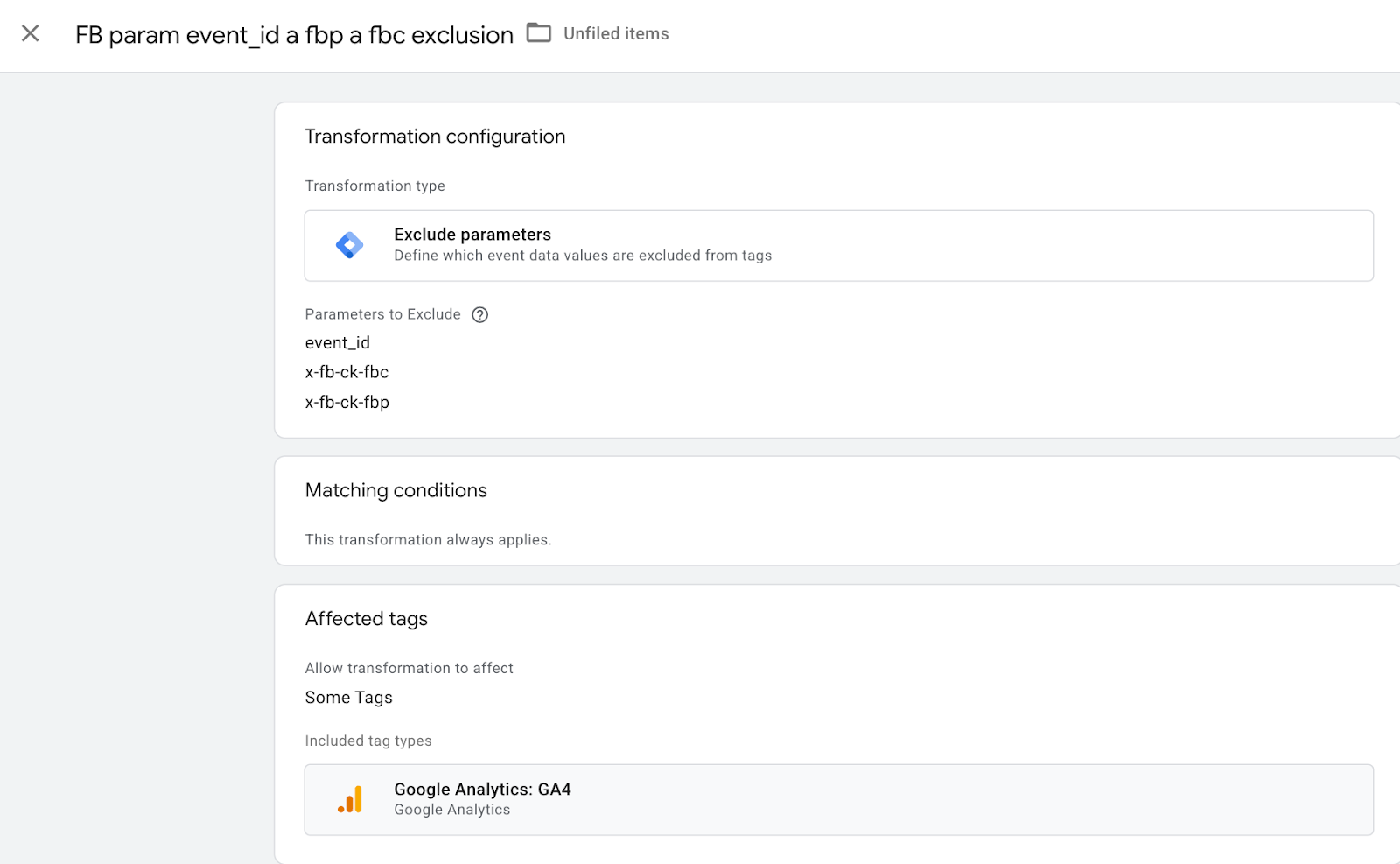
• On the other hand, some parameters can cause a tag to fail (for example, lead_id, or Facebook’s contents parameter incorrectly sent as an object instead of an array).

• Always check the Outgoing request in debug mode to make sure nothing is throwing an error. Server-side debug isn’t as “talkative” as front-end debug, so issues can be much easier to miss.

If your hybrid FB CAPI setup is configured correctly, you’ll start seeing a light-blue line next to individual events in Facebook Events Manager, indicating data that came from the server. The image below shows an example of a perfect outcome that meets Facebook’s highest requirements - more events are being sent from the server than from the browser, deduplication works, and it’s a thing of beauty :) 
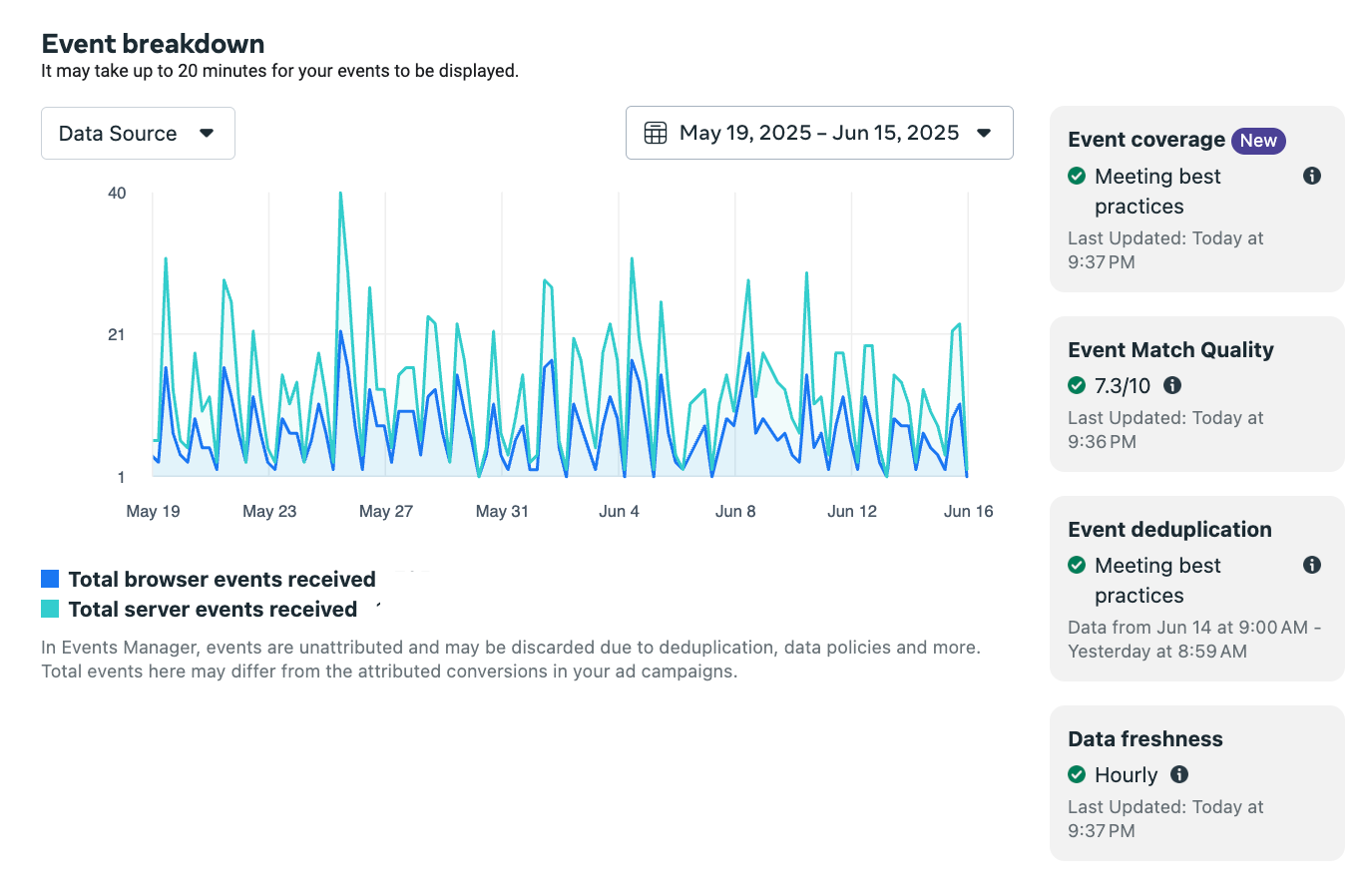
Here we’re looking at a form submission event, where ad blockers are very commonly involved. This is where the server-side approach really shines. In addition, Facebook can use not only the event_id for deduplication, but also extra data such as hashed email or phone number (if sending personal data is allowed, we strongly recommend doing so - Facebook has an excellent match rate especially with phone numbers). I’ve seen cases where there were many times more browser events than server events, because the server tag in GTM was blocked due to consent (?), along with a few other quirks.

In the end, with this migration we landed at 33 events successfully deduplicated in a hybrid CAPI setup.

Google Ads

In parallel with the Facebook rollout, we also worked on implementing Google Ads and Sklik. Google Ads and Sklik had a completely different structure compared to Facebook tags - and there were significantly more of them. For Google Ads, there were 72 tags, and the same number for Sklik. Once again, we went through a review cycle with the marketing team: which events to keep, which to merge, and which ones to add after all. This time, we actually went in the opposite direction, and the final number of tags ended up being higher.

For Google Ads and Sklik, no deduplication is needed - the tags are fired either from the browser or from the server.

Sklik

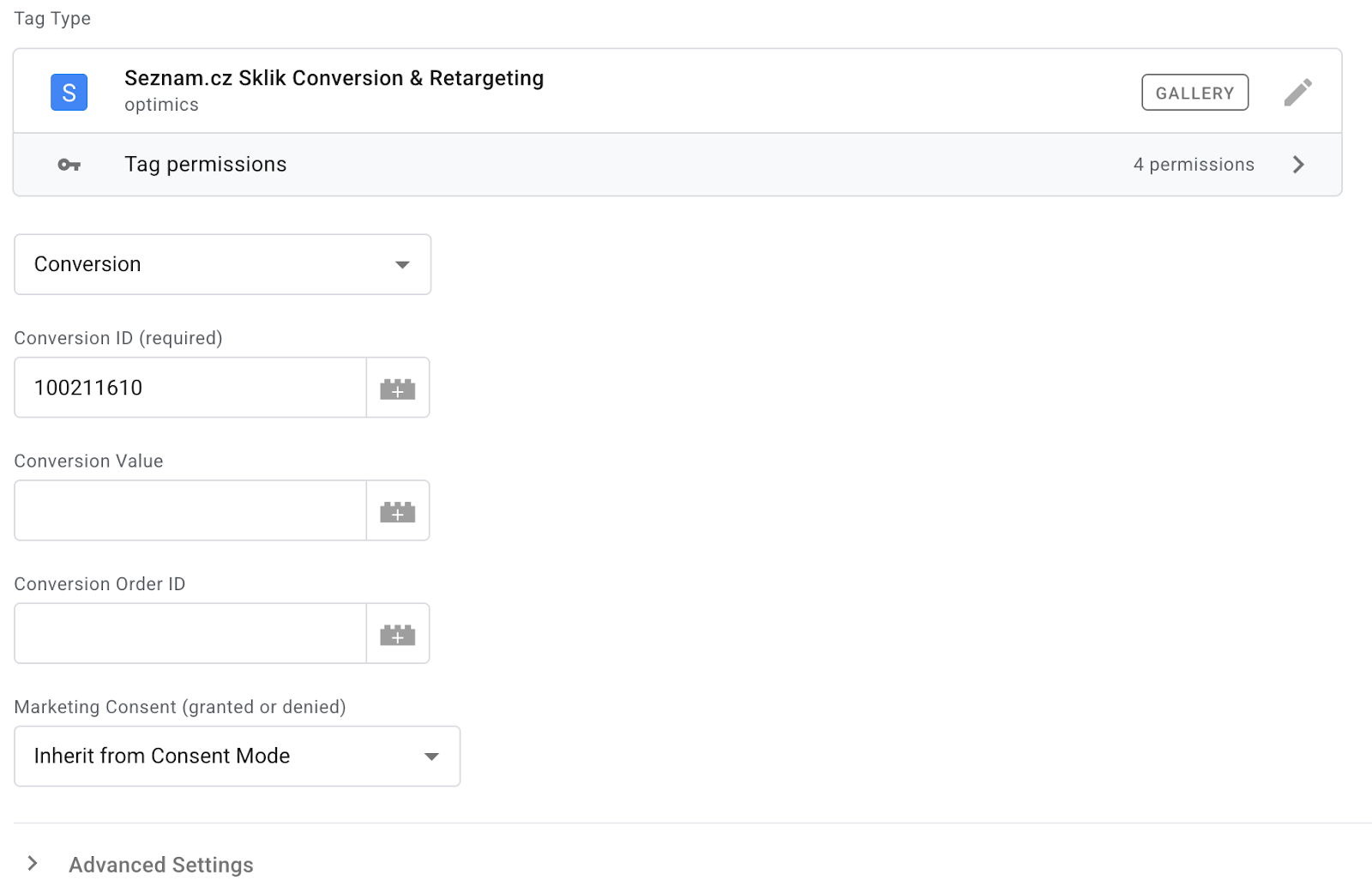
At the time of the migration, Sklik did not have an official server-side template. The team at Optimics created one for the client and later made it publicly available. The template is easy to use, and its setup is no more complex than on the front end.
Bing

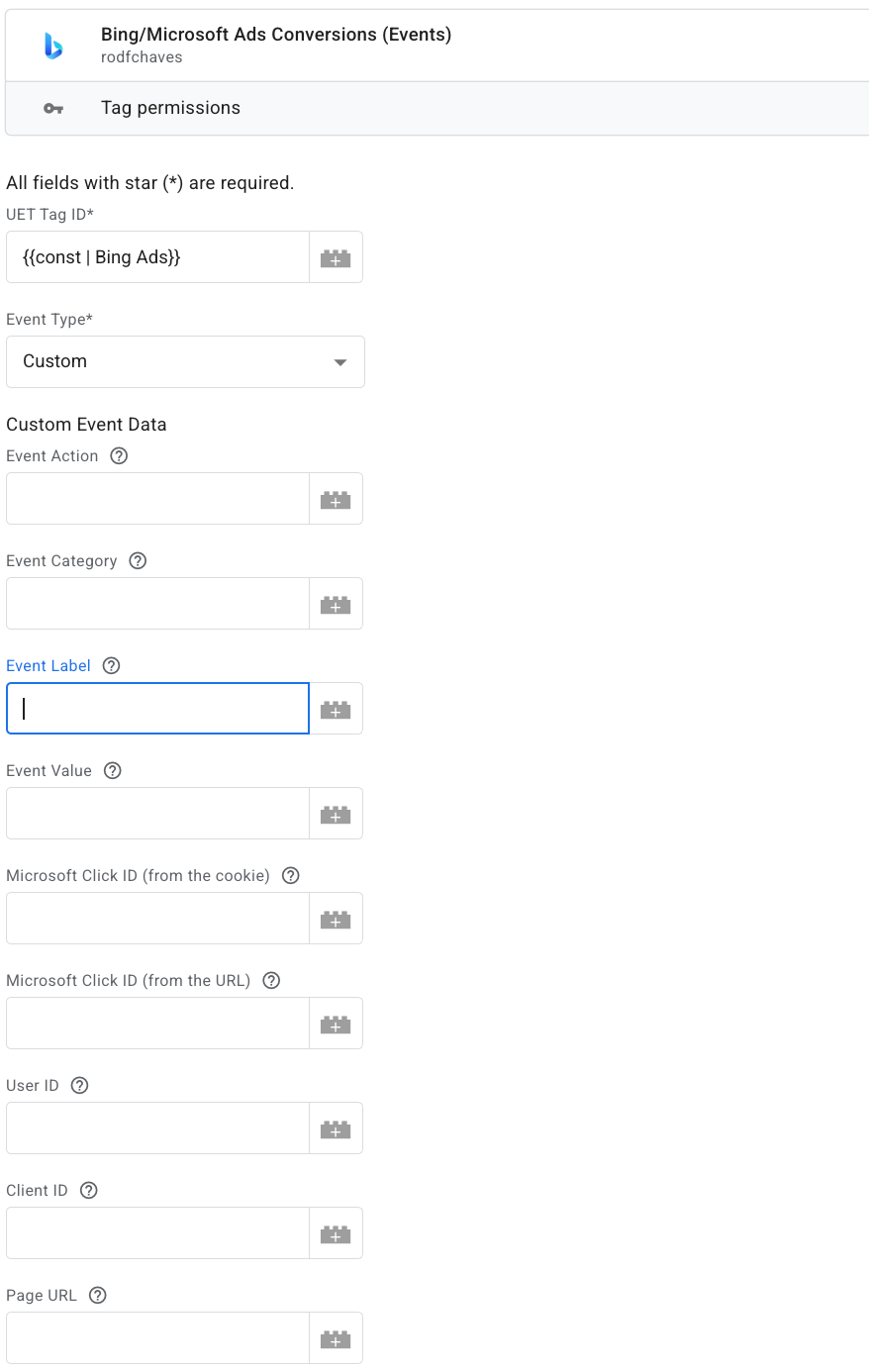
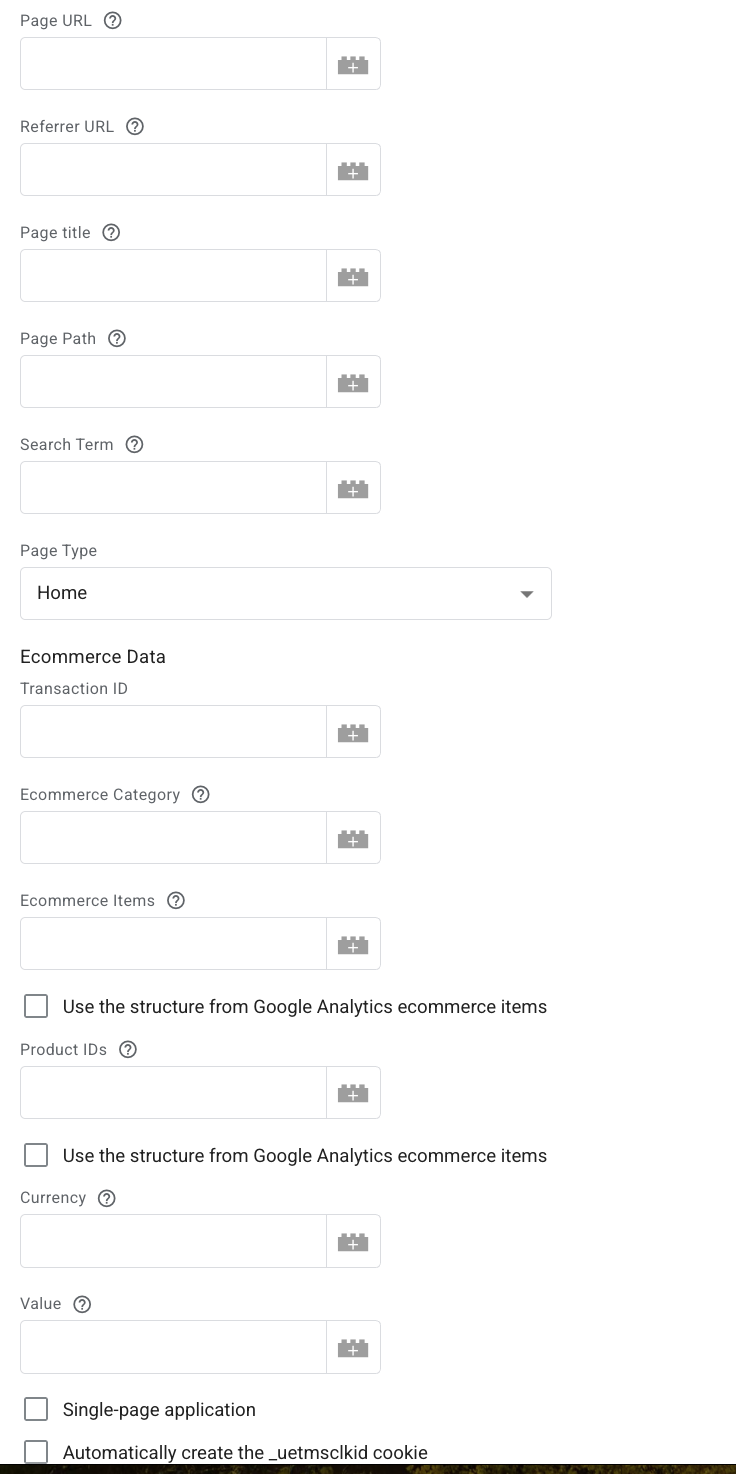
Compared to the front-end version, the Bing server-side template includes a wealth of information (including e-commerce data) that you can send to the advertising platform. However, the only required fields are the system ID (UET Tag ID) and the event name.
Type image caption here (optional)

Consent

And what about consent? The STAPE Facebook template includes an option to specify whether you are sending only consented data to the server, or whether you want the template itself to respect the consent parameter.
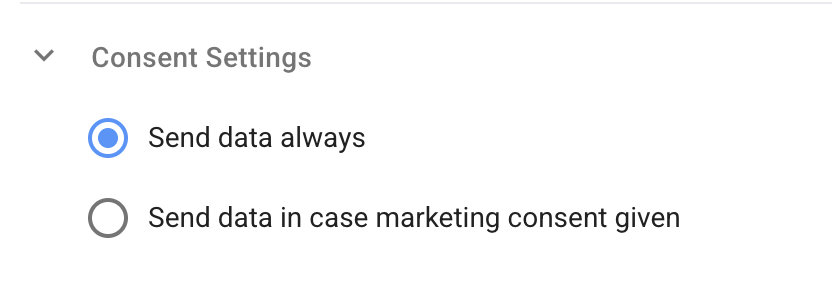
Google Ads on the server inherit the Consent Mode parameters from the front end, meaning they pass information to Google about whether the data can or cannot be used.

The Sklik template by Optimics has Consent Mode integration built in.

In the Bing server-side template, there was initially no explicit indication of how consent was handled. We contacted the template author, who promised to add this information - and did. In practice, the tag is now sent together with an explicit consent or no-consent parameter.

Summary 

This was not a technically complex migration, but it required a lot of testing and attention to detail.

For each tag, we had to verify that the server-side trigger fired the tag correctly - otherwise, marketing would have lost conversions.

At the time of the migration, Sklik did not have an official server-side template. The team at Optimics created one for the client and later made it publicly available (link).

Sklik, Bing, and the remaining tags were then taken over by the client’s lead analyst - a big thank-you to him and the entire marketing team for their great collaboration and support. After several months of testing and deep-diving into tag configurations, I was even dreaming about tags, and I was more than happy to hand the project over.

List of used templates + links

Facebook Conversion API by STAPE (server tag)

Unique Event ID (front-end variable)

Google Ads Conversion Linker + Conversion Tracking (server standard tags)
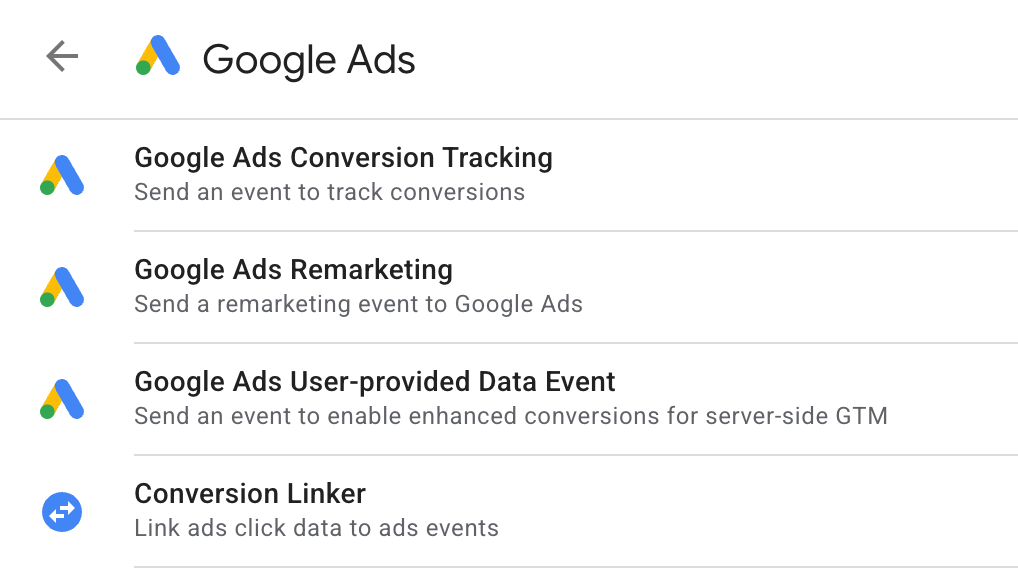
Sklik template by Optimics (server tag)

Bing template (server tag)

Server-side migration may feel like a routine task these days - but trust us, it can still be quite a ride :)

Authors

#
Blog post
Analytics is a great career path for women - including moms returning from (or during) maternity leave
20/11/2025

I studied economics and spent many years working as a project manager in an agency. But coordinating other people’s work wasn’t enough for me — I wanted to truly master something myself. I’ve always enjoyed math, so I gradually, almost naturally, shifted into analytics. I started around 2014 as a self-taught analyst, later began working with Vašek Jelen, and in 2020 we founded MeasureDesign together. I quickly realized this field was exactly what I’d been looking for — it satisfies my curiosity, my need to dig into details, and my desire to bring a bit of “ordnung” into things. In the whirlwind of running a household, taking care of kids, and navigating global chaos, data feels oddly calming. At the same time, it lets me use my creativity when I play detective and hunt down measurement issues like a modern-day Miss Marple. I genuinely believe analytics is a great career for women in general. And yet, there still aren’t many of us in the field.

#
Blog post
BigQuery: How to move a GA4 dataset to another GCP project
1/11/2025

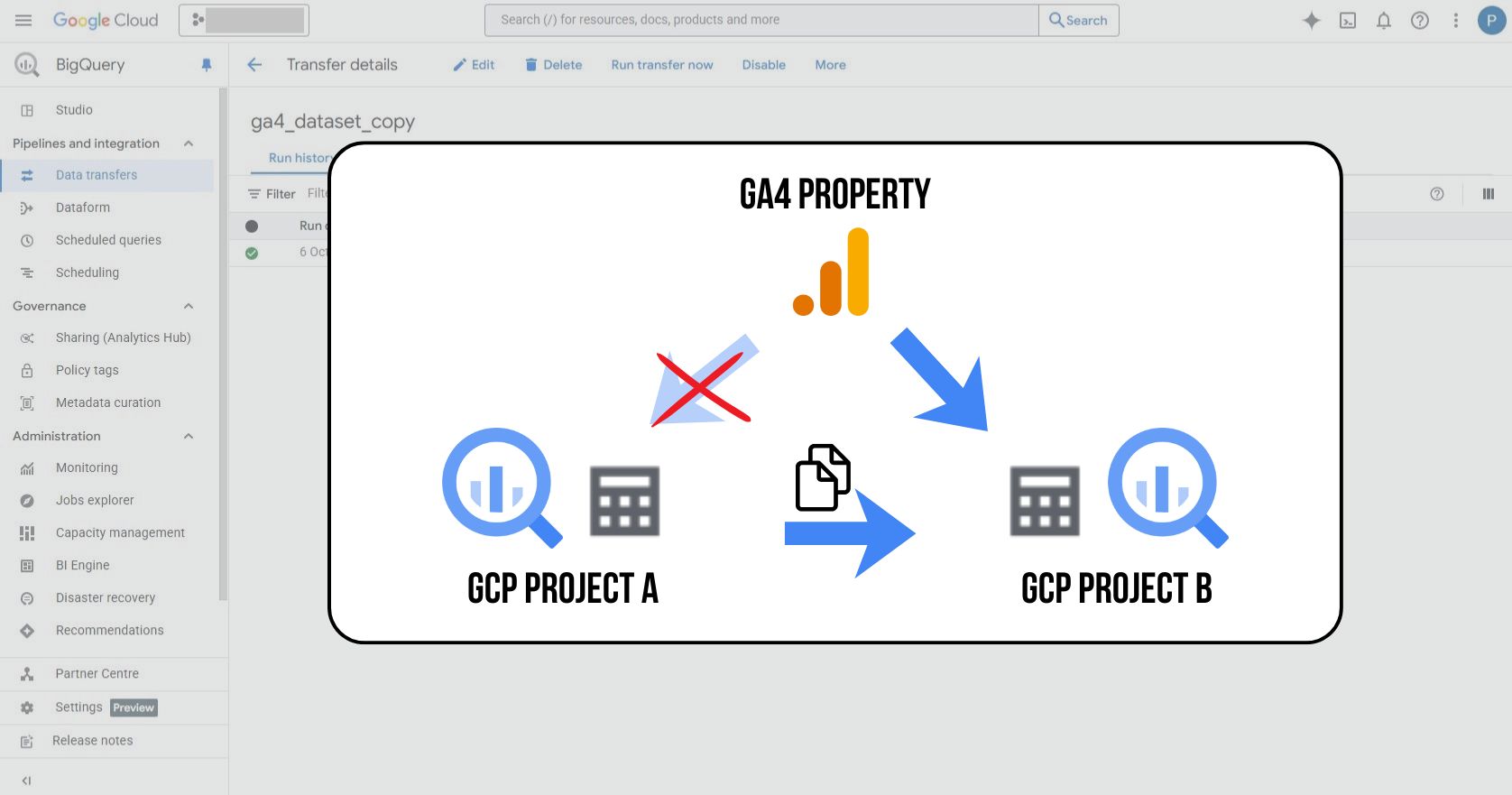
Sometimes you need to move historical data from a Google Analytics 4 export to a different BigQuery project – for example, when changing your project structure, switching to a new billing account, or consolidating data. In this article, we’ll show how to copy GA4 datasets using BigQuery Data Transfer Service (there are other methods as well).

#
Blog post
How we migrated 130 media tags to the server - and how it all turned out
16/10/2025

With the rise of server-side measurement, we are increasingly implementing server-side tracking for our clients not only for analytics, but also for advertising platforms. In this article, I want to share our experience with a server-side implementation of media tags for a larger client - what we learned along the way, which templates we used, and what to watch out for.

#
Blog post
Hack Your Weekend
23/9/2025

From Idea to App in 48 Hours 🚀 I spent the third weekend of September at the Clubco CZ coworking space in Brno, taking part in the #HackYourWeekend hackathon. In a group of 60 people split into eight teams, we spent Friday through Sunday afternoon developing eight applications addressing real-world needs. We built everything in AI/LLM-supported development environments (our team used VS Code + Claude Code). The participants ranged from developers already building with AI to people like me who wanted to dive in and really try this kind of workflow for the first time.

#
Blog post
MeasureCamp Brno 2025
10/9/2025

On September 6, another edition of MeasureCamp - our favorite community event - took place at Brno’s Gen. We were thrilled to see that 74 women attended this year’s MeasureCamp (5.4% of them from our team 🙂), and it’s clear that the number of women in data and analytics continues to grow 🚀.

#
Blog post
How to calculate the date of Easter in BigQuery
16/4/2025

Easter is a movable feast, and its date changes every year. If you work with data — whether you are analyzing seasonal traffic trends, comparing campaign performance, or planning marketing activities — it can be useful to know the exact dates of the Easter holidays. That is where a simple SQL script for BigQuery can come in handy.

#
Podcast
Socials: Vašek Jelen discusses GA4, server-side tracking, BigQuery and connecting customer data with campaign performance
19/11/2024

Socials podcast and 80 minutes of conversation with Daniel Bauer and Otakar Lucák about digital analytics, with a focus on e-commerce. The guys deal with a number of specific topics in their client work and had some great questions. Thanks to this, I think we kept it very practical, and the podcast includes our opinions on how to resolve real-life situations from practice.

#
Blog post
MeasureCamp Prague 2024: Using Google Ads export in Google BigQuery
10/9/2024

On Saturday, the ČSOB building in Prague was buzzing with analytics topics. A large part of the MeasureDesign team showed up for the 10th anniversary edition of MeasureCamp Czech Republic — and Vašek and Anička gave a talk on working with the Google Ads dataset in Google BigQuery.

#
Blog post
Data retention: Storing data in Google Analytics 4
31/8/2024

Data retention in GA4 determines how long information about users and events will remain available. By default, this period is only two months, which can limit your analysis options. In this article, you'll learn how to extend this period to up to 14 months (or 50 months with GA4 360) and what the retention setting does not affect.

#
Blog post
Workshop: GA4 basics for the Tereza non-profit organization
3/6/2024

On the last day of May, we spent time with the team from the Tereza non-profit organization, focusing on the basics of Google Analytics 4. We concentrated on the practical use of data, especially for the Učíme se venku ("Learning Outdoors") program, which helps teachers bring lessons from the classroom to the outdoors.

#
Blog post
Reshoper 2024: New opportunities in analytics
20/5/2024

At the Reshoper conference, I had the opportunity to give a talk where I summarized new opportunities for e-commerce analytics. In the presentation, I shared my experience and approaches on how to get the most out of Google Analytics 4 — especially when combined with BigQuery and other Google Cloud services.

#
Blog post
Marketing Festival 2024: Learn to work with GA4 data in BigQuery and GCP
22/2/2024

This workshop focused on working with GA4 data in BigQuery and Google Cloud. My goal was to help participants move beyond the GA4 interface and show that working with raw GA4 data is not rocket science :) On the contrary, it is a valuable skill that is worth learning, because raw GA4 data hold huge potential for monetization and activation. I also shared real-world examples and reporting concepts from companies that rely entirely on BigQuery data. The participants were fantastic, and it was great to see how many people are actively exploring BigQuery and GCP. It felt like we were all on the same wavelength.

#
Webinar
Tips and tricks for GA4 not just for Shoptet users
25/11/2023

A recording of the public webinar we hosted with Marek Čech for Shoptet. The main topic was practical recommendations for evaluating campaigns in GA4 in connection with the upcoming Black Friday and Christmas season.

#
Webinar
Webinar: Evaluating GA4 Data in BigQuery
21/6/2023

Together with Vašek Ráš, we hosted a public webinar on evaluating campaigns using the GA4 dataset in Google BigQuery. Our guest speaker was Honza Tichý, who presented a section on DBT.

Martina Kvasničková
AI & Data Research
Anna Horáková
Analyst
Zuzana Mikyšková
Analyst & Co-Founder
Vašek Jelen
Lead Analyst & Co-Founder
Blanka Hejduková
Back Office
Markéta Svěráková
Analyst
Petra Súkeníková
Analyst
Klára Belzová
Analyst
Martina Kvasničková
Martina Kvasničková
AI & Data Research

Marťa helps integrate AI into everyday work—making it faster, more efficient, and accessible to every team member. What excites her most is finding practical ways to use AI and turning new technologies into useful tools.

Anna Horáková
Anna Horáková
Analyst

Anička has over 7 years of experience in the agency world, where she has managed social media ad campaigns for clients, and especially for content-driven websites, her favorite. Wanting to broaden her perspective beyond campaign data, she gradually shifted her focus toward web analytics. She joined our team in 2022 and now specializes in data analytics, using GA4, BigQuery, Looker Studio, and other tools to connect and dig deeper into data — delivering insightful analyses and valuable input for business decisions.

Zuzana Mikyšková
Zuzana Mikyšková
Analyst & Co-Founder

Zuzka's career path led her through corporate innovation and research management, running word-of-mouth projects, and later to a digital agency, where she managed website development projects. However, Zuzka is naturally curious and wanted to understand how a website actually works once it is launched into the world. That curiosity led her to study web analytics — and eventually to a key collaboration with Vašek. In 2019, they founded the company together.

Vašek Jelen
Vašek Jelen
Lead Analyst & Co-Founder

Vašek has been working in digital analytics for over 15 years — from setting up tracking to data storage, visualization, and interpretation. He helps companies bring organize their data and make full use of it. He focuses primarily on data from digital platforms such as websites, apps, and client zones, and on connecting that data with other business data like media and customer data. After years of freelancing, he co-founded the analytics studio MeasureDesign, where, in addition to working on analytics projects and bespoke training sessions, he also mentors and educates new analysts.

Blanka Hejduková
Blanka Hejduková
Back Office

Blanka joined our team in 2024 and has been responsible for back-office operations, including invoicing and administrative tasks, ever since. She draws on her experience from the Czech Post and her background in financial management to keep everything running smoothly. In her free time, she enjoys traveling with her two children and finds relaxation in working in her garden.

Markéta Svěráková
Markéta Svěráková
Analyst

Markéta started out in marketing, but then came maternity leave — and with it, total chaos. In an effort to hold on to the last bits of sanity, she turned to data. After all, numbers don’t yell, spill cereal into your keyboard, and at least they make some sense. She completed a data analytics course at Engeto Academy, where she bonded with SQL, Power BI, Excel, and Python, and started looking for patterns outside the bounds of children’s coloring books. Today, at MeasureDesign, she helps clients understand what their numbers are really saying.

Petra Súkeníková
Petra Súkeníková
Analyst

She joined MeasureDesign in 2023, specialising in measurement implementation and reporting. Her favourite moment is when, after all the setup and testing, the first data finally starts flowing in. Her biggest challenge? The unexpected (and often undocumented) changes from Google – those are the times when every analyst turns into a paranormal behaviour expert. 👻

Klára Belzová
Klára Belzová
Analyst

Klára has been with the company since 2019. She focuses mainly on web analytics but is not afraid to dive into data work in BigQuery. What she enjoys most is guiding clients through the entire process — from defining their needs to implementing tracking and creating the final data visualizations. She gets an almost suspicious amount of joy from a clean and well-organized GTM container or a report full of useful data.